
So you have a library of clips, now what?
Maximizing your clips:
Inspiration & Examples Featuring Lumen Gallery
Whether you are utilizing video clips as an entry level marketing solution for your small business or as an add on to stretch a finished project further, the opportunities are endless, you may have heard this way of thinking about your collection of media as "batching content." I created this guide to share strategic ways to maximize a library of clips and elevate your digital presence.
Featuring: Lumen Gallery

Lumen Gallery is a dreamy boutique destination featuring handmade jewelry by Cierra Designs alongside a curated selection of aspirational lifestyle goods and fine art for the home. The brand champions an elevated way of living, inviting clients to make intentional investments in beautiful, enduring pieces. While the strategic framework outlined below is tailored specifically to capture Lumen Gallery's unique essence, it serves as an excellent blueprint for high-end, luxury marketing across the industry. Here is how I approach storytelling and positioning for this fun brand.
A Quick Note: Every business has a unique workflow and distinct marketing goals. This guide serves as a practical blueprint of how to utilize video clips for a brick-and-mortar boutique and gallery, using Lumen Gallery as our case study. Click here to read more about the creative vision behind this particular business.
Because social media interfaces are constantly evolving, platform layouts and technical features can change overnight. For immediate technical troubleshooting, a quick online search is often the fastest way to find the most up to date solutions. Creating permanent templates for these rapid interface updates would quickly become outdated.
However, if you are looking for personalized, strategic guidance tailored to your brand, I offer dedicated consultations where we can dive deep into your specific questions and content goals.
Here, I will talk about:
Click on the underlined text to jump to that section.
A Note on Terminology:
- Story - temporary & disappears after 24 hours
Good for: quick announcements, in the moment posts like "good morning," or "happy Friday," time sensitive announcements, reposting current or old posts
- (Feed) Post - typically used for more polished content, these are permanent (unless you delete these from your page yourself) this post will be part of your feed so planning based on other posts can be important. Reels and Carousels are both examples of posts.
Good for: evergreen posts like, about me, product features, behind the scenes stories, and polished event anouncements
The three most common formats for Feed Posts are:
-
Single Image / Video: A traditional post containing just one photo or one short video with a caption below.
-
Carousel: A single post that contains a slideshow of multiple photos or videos (typically 2 to 10 slides) that users swipe through horizontally.
-
Reel: A dedicated vertical video format designed to capture attention quickly, often utilizing trending audio, voiceovers, or text on screen.
All of the examples were edited directly in the Instagram app except the final professional reel. You have access to these tools for free.
If you need a more in depth explanation of the different social media platforms, see the social media guide or schedule a consultation.
Note: Any specific third-party tools or social media applications mentioned in this guide (such as Canva or Instagram) are referenced purely as examples of industry-standard resources. This guide contains no sponsored content or paid advertisements.
Your Clip Library
When you already have a gallery, think about what you have and if there are patterns. Notice collections of complementary videos bringing together collections like colors, subjects, or actions.


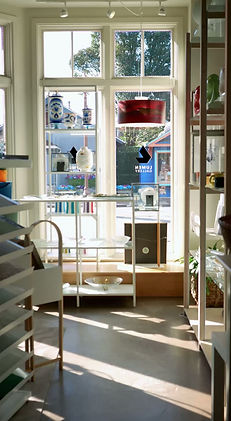

Here are 8 clips all about 4-9 seconds long from a library delivered to Lumen Gallery.
CLIP 1 : DETAIL SHOT - POPPY
CLIP 2 : MEDIUM SHOT - POPPIES
CLIP 3 : WIDE SHOT - WINDOW
CLIP 4 : MEDIUM SHOT - STOREFRONT

CLIP 5 : WIDE SHOT - GALLERY WALL


CLIP 6 : MEDIUM SHOT - PAINTING
CLIP 7 : MEDIUM SHOT - JEWELRY

CLIP 8: DETAIL SHOT - JEWELRY
Using your Clips for Stories:
Using clips as story backgrounds are some of the easiest ways to use them. Here are some text on screen options but sometimes if you have a really good clip, it can stand alone or you can get even more creative like the last example.
It's a story, it's really not that deep, sometimes meant to show more in the moment content and isn't always polished. These will automatically disappear after 24 hours.
Story Idea 1:
Relevant Day of Stories
You could use these in your story to announce day of updates:
- Daily hours
- Holiday Hours
- Sales
- Events
- "Happy Monday"
- Weather


Story Idea 2:
Highlight a Specific Product
Clips are a great way to highlight a specific product, service, or collection on your story.
- Featuring a long time favorite
- New arrivals
- Tagging an artist
Think of clips that pair well together like:
- certain colors
- a two part phrase or saying
- collections
- doing an action that shows the process
(ex: clip 1: wrapping up a purchase into a Lumen Gallery bag, clip 2: customer carrying Lumen Gallery bag)

Story Idea 3:
Two Part Stories


Story Idea 4: Minimal Effort,
Maximum Personality
Stories are great for adding personality to your account. For this particular client, music is very important and is part of setting the tone for the shop that season.
Use the sticker icon when creating your next story and see what features you can easily use like asking questions and running polls.
Using your Clips for Reels:
These clips are meant to be polished enough to live on your main grid so utilize these as more posts. Reels published as a post are more evergreen as they show up on your main grid, though you do have the option to hide them. If I were a gallery boutique, here are some things I would do with them.
You can use clips as a stand alone reel. Just post one with some audio that matches your brand but make sure to make write a caption since there is not much value from the video, it's just a pretty looking hook.
Reel Idea 1:
Using text on Clips

This one can really depend on your brand voice but one way to boost watch time on reels is to put an interesting hook on a video and then write the answer in the caption. If you open up any app to look at shorts you will find endless examples of this strategy.
For this particular client though, we want to focus on elevated and timeless marketing so this approach is not a strategy we use often. If I were to want to add text to Lumen Gallery's reels I would focus on quotes or minimal wording like the example here.
Other brands often use text on screen as a hook, education, or general announcements.
Reel Idea 2:
Editing Multiple Clips Together
For a more advanced option but a necessary way to sometimes add more time to your reel, simply piece together a few clips, the more you practice this, the more you will come up with your own formulas. You can easily put videos together within the social media apps. Everything seen on this page was edited through the Instagram app when creating a new reel.
A good formula for something like a brick and mortar shop and so many other businesses:
establishing shot (or you could think wide shots) + the details (close up shots)

Reel showing wide establishing shots then detail shots.

Caption this with information about the artist, why this piece is special, origin story, etc.

These are would be close to the concept for an standard reel edit (multiple videos pieced together to music) but not quite as punchy and polished because the instagram editing tool is not as robust as what I use. I just also think clips have so much potential I can't not mention the possibility to edit them yourself but of course I am always happy to edit more to take that tedious task off your plate but the opportunities for what you can do with your clips are endless. Here is an example of a standard edit for Lumen Gallery so as a comparison.
If you are interested in standard editing so all you have to do is post edited reels to your site, you can inquire here:
Professionally filmed & edited Reel by Ashley Hamada
Using your Clips for Carousels:
A carousel is similar to a reel in that it is part of your main feed but these give you the option to add multiple videos as separate clips or even mix photos and videos into one post. Right now, in 2026, carousels with videos are becoming more and more popular. Carousels are also good options for those not wanting to deal with the video editing and the audio aspect of reels.
These are a good way to level up the posting of a single clip without editing it together. It's as easy as posting a picture carousel. You would post these as separate videos in once post to create a carousel.
Carousel Idea 1:
Pick a Theme
I wanted to create a carousel from the limited clips, aside from just showing off favorite products, I decided to lean on all the idea of a "blue collection." You could caption this carousel with something like "Feeling blue never looked so sophisticated. Embracing the quieter, more introspective moods with a collection of deep, calming hues designed to romanticize the slower days."


Slide 1
Slide 2
Slide 3
Carousel Idea 2:
Using text on Clips
Like the Reel Idea 2, you can also add text to carousels. The difference is that each clip is it's own "slide" instead of it being one edited together video.
Advanced tip: Add text to your individual clips using Canva, Instagram Reels, or by downloading a drafted Story to your device.
Here are examples of the same carousel with text placed on top of the clips. Here I used Instagram Stories but you will have more creative freedom and a polished look when you use something like Canva.

Slide 1: "Embracing all the blues."


Slide 2: "Decorate your space..."
Slide 3: "... or decorate yourself."
Pro-Tips:

Start by looking for patterns so you can keep in mind the clips that pair well together: ex: Stories styling an item, a color, a theme, a sequence of events
Most of the clips you will receive from me will not have audio but always keep in mind what audio the clips might have on it, especially if they were recorded on a phone. I suggest just always making sure to mute the volume of the video if you know it isn't part of what you are trying to share.
Take screenshots from your clips to use as photos if you need them.
You can mix your own footage and professional clips with the trend of showing the behind the scenes "messy" reality and then showing the finished product. This is good for photographers, artists, and any transformation brand.
Disclaimer: Hamada Made is not affiliated with, sponsored by, or endorsing any of the third-party platforms mentioned in this guide, including Canva or specific social media applications. All references are intended strictly for educational and informational purposes as examples of industry-standard tools.